Using Connected Service

Remote Control

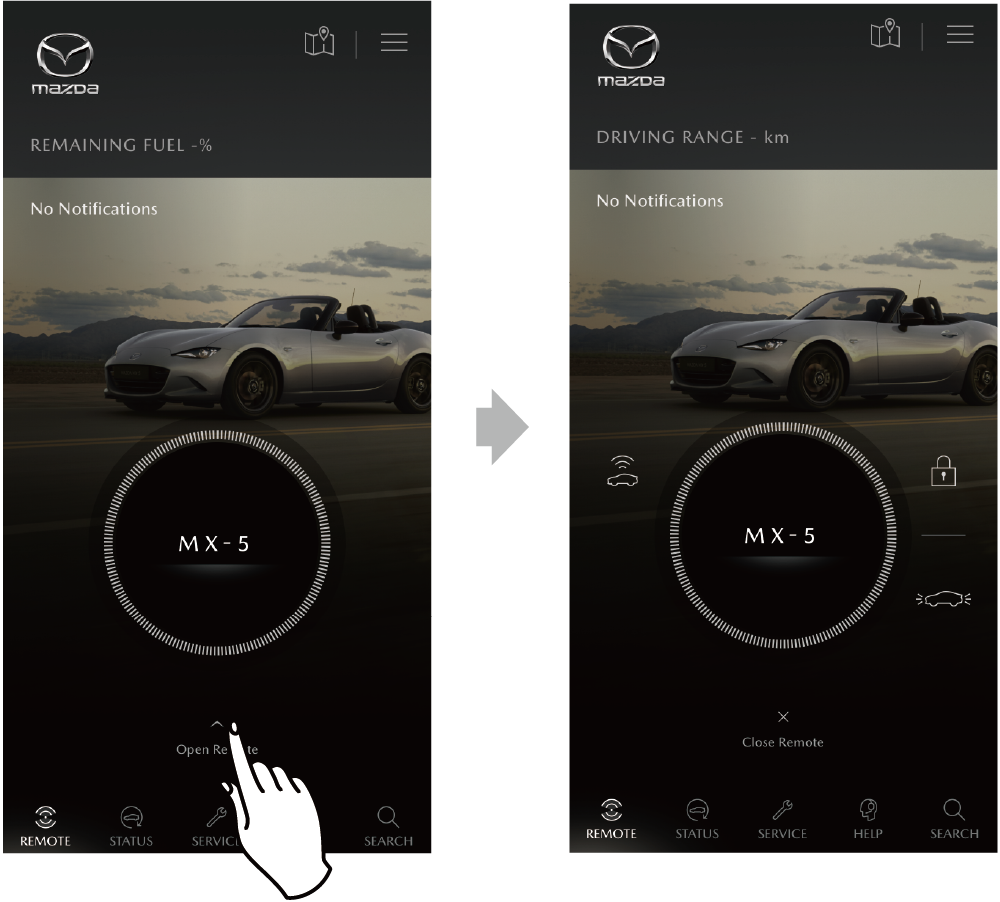
The Remote Control can be used from the home screen.

  • There may be a delay time between the device operation and the actual execution of an operation on the vehicle when using Remote Control.
  • If the ignition switch has not been switched on for 9 days or longer or there is frequent communication with the communication unit, signal detection on the vehicle side will no longer be possible and the Remote Control will be temporarily unusable.
  • When the vehicle is in a location subject to weak radio wave signals, such as an underground parking garage, communicating with the system may be difficult, therefore, the location indication may be incorrect and/or operations may not be able to be performed.
  • If the engine has not been started for a long period of time and the doors are repeatedly opened and closed, the remaining battery charge level could be low. In this case, start the engine and let it run for 5 minutes or longer to charge the battery.
  • If the remaining battery charge level is low as indicated above, a message is displayed on the multi-information display and a low battery charge warning beep may be activated for some vehicles. In this case, the following Connected Service functions will not be available.
    Vehicle Status Alert / Remote Control

The Remote Control operation record is stored in the INBOX.

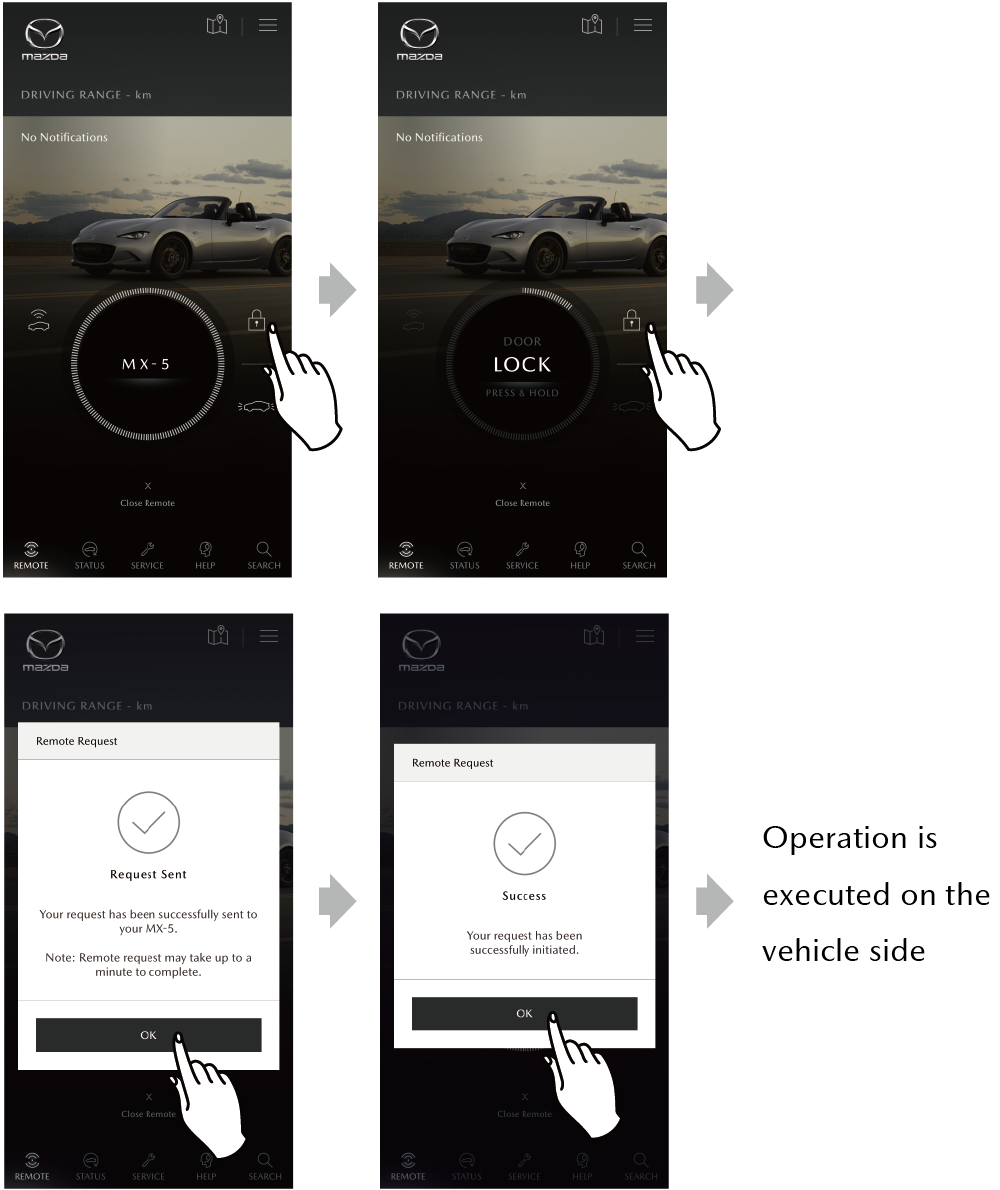
Using Remote Control, operations can be implemented by touching and holding an icon for the desired operation.
(Example) Door Lock

A pop-up message is displayed when each type of request is sent. The results of execution can be checked from the Inbox.
Menus of the MyMazda APP/INBOX/Category Tab/Active History

  • Operations are not executed if you release your finger from the screen before the round meter completes its circle.
  • Even if a request transmission is successful, an error may occur with execution of the operation on the vehicle side due to a cause such as a door left open. If an error occurs, a pop-up message is displayed.
  • You can check the results of a remote control operation at MESSAGE CENTER from MENU.
    Menus of the MyMazda APP/INBOX
  • If the push notification setting is turned off, push notifications for the operation execution results to the vehicle are not sent.

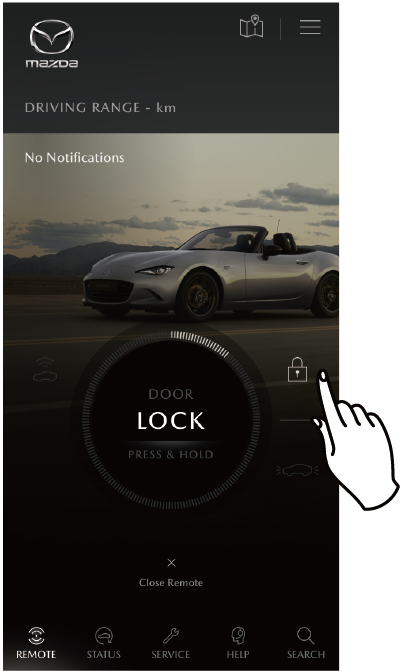
Remote Door Lock

Locks the doors using the Remote Control.
Press and hold the lock icon.

  • Neither door locking with the Remote Control will work if the car is in the following conditions:

    –The engine is running.
    –The key is left inside the vehicle.
    –Any door is open.
    –The boot is open.

  • The Remote Door Lock cannot be used when the push button start system function and advanced keyless function are set not to operate to prevent them from affecting medical devices such as pacemakers.

Remote Headlights

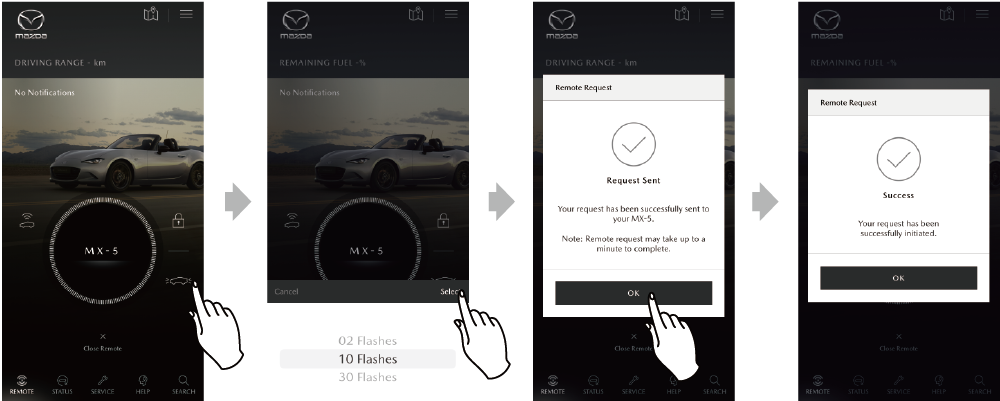
The headlights can be flashed using the remote control.
Press and hold the vehicle lights icon.

  • The number of times the headlights flash can be set for each run (2 times/10 times/30 times).
  • The remote headlights cannot operate if your mobile phone or vehicle is out of communication range.
  • The remote headlights do not operate under the following conditions.
    –The doors, boot, or liftgate is open.
    –The ignition is switched ON.
    –The headlights are turned on.
    –The hazard warning lights are operating.

Remote ChargingPHEV

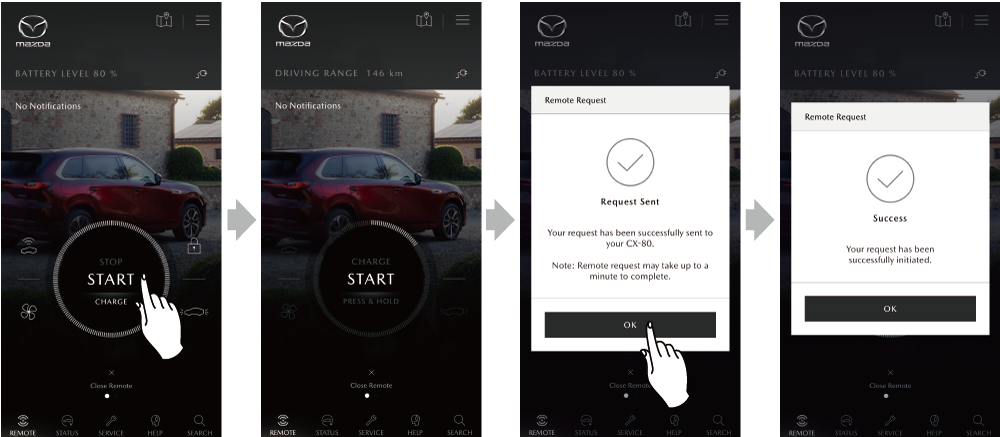
  • Remote Charge Start

Once you have your vehicle ready for charging, you can begin charging the remaining battery using the Remote Charging.
Press and hold [START] on the home screen.

  • When the vehicle meets all of the following conditions, the Remote Charge Start operates.

    –The shift lever is in the P position.
    –The vehicle is not 100% charged.
    –The charging plug is connected to the vehicle correctly.
    –The vehicle is not currently being charged.

  • For details on charging, refer to the vehicle owner’s manual.
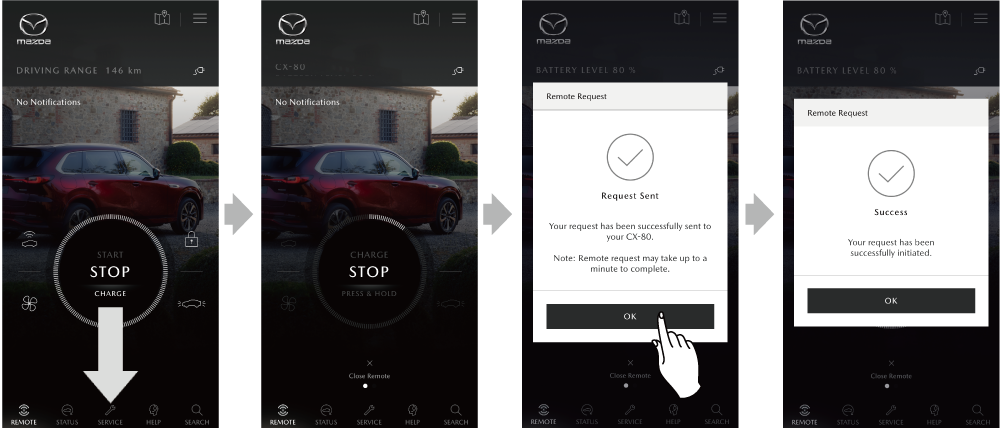
  • Remote Charge Stop

The charging can be stopped using the Remote Charging.
Scroll down from [START] to display [STOP] in the centre of the screen, and then press and hold [STOP].

Remote Climate ControlPHEV

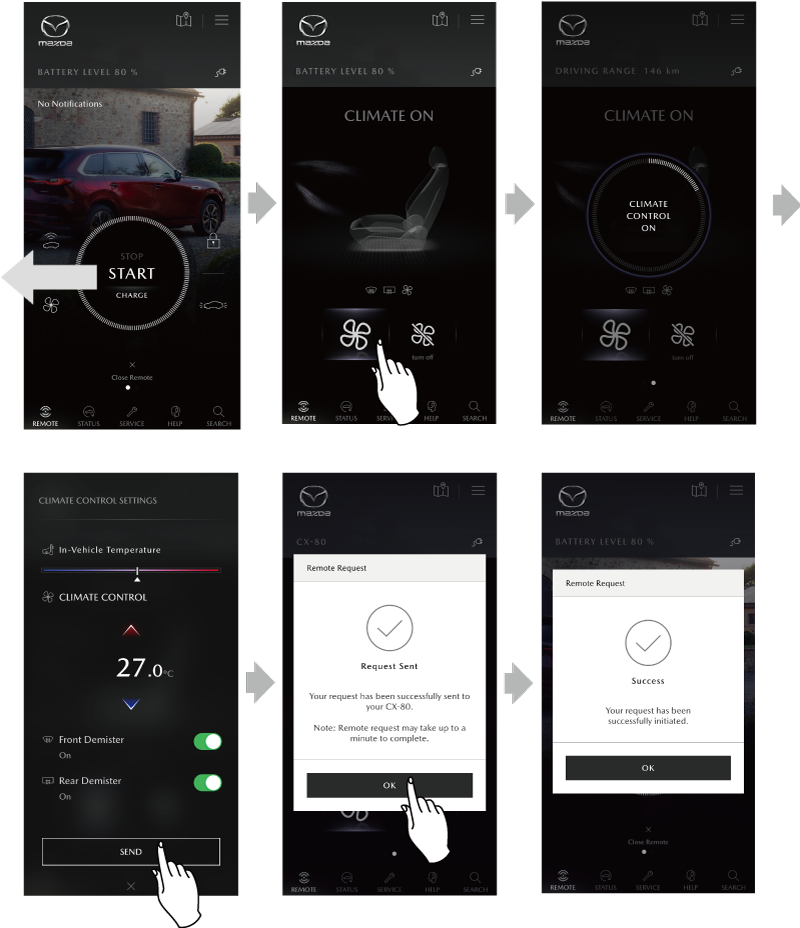
  • Remote Climate Start

When the air-conditioning system is not operated, you can use the Remote Control to operate the air-conditioning in the cabin.
Swipe the home screen to the left, press and hold , and the air-conditioning settings screen is displayed. After selecting the temperature setting and the defogger on/off on the setting screen, press the SEND button.

  • If the vehicle is in any one of the following conditions, the Remote Climate Start will not operate.

    -The power switch is switched to ON or ACC.
    -A door bonnet is open.
    -The remaining battery charge level is low.

  • Even if the air-conditioning system has operated, if any condition other than the above occur, the air-conditioning system stops automatically. (Except for liftgate)
  • The air-conditioning system operated by the Remote Climate Stop automatically after 30 minutes.
  • If quick charging is started/ended while the Remote Climate Control is operating, the air-conditioning system stops automatically.
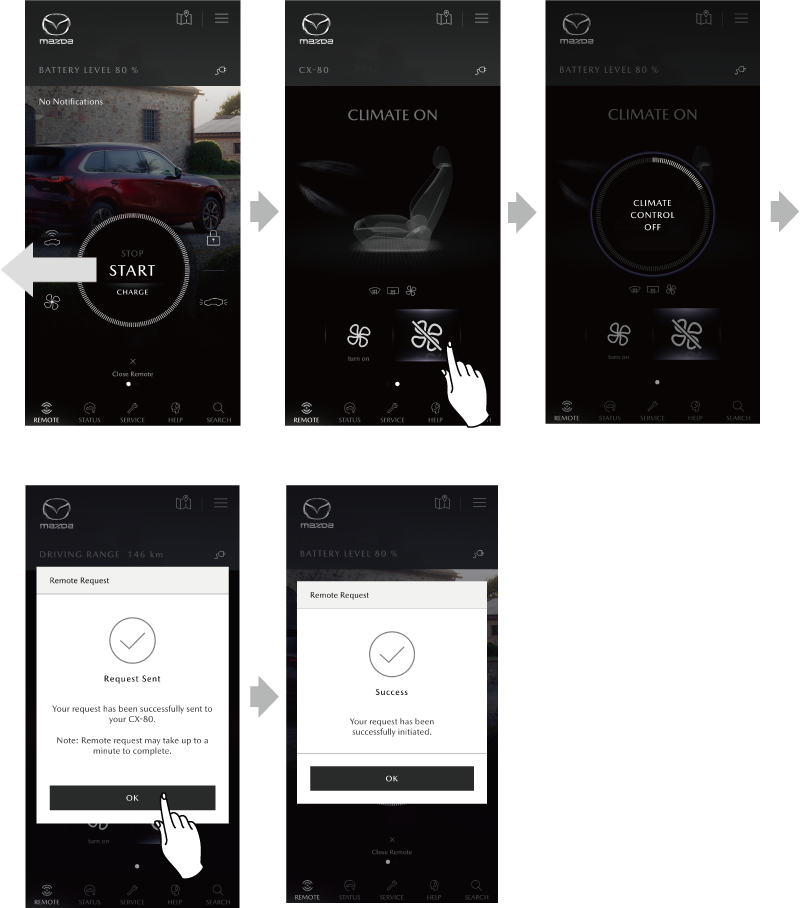
  • Remote Climate Stop

The air-conditioning in the cabin can be stopped using the Remote Control. Swipe the home screen to the left, and then press and hold the Remote Climate Stop icon .

  • If started using the following methods, the remote climate system can be stopped.

    –Started using the Remote Climate Control
    –Started by setting the vehicle’s timer air-conditioning